Sandbox Access
Before you continue we want to double check that your access is legit. Perform the following steps:
- Open the folder titled Check Sandbox Access and click on the call titled Retrieve Your Sandbox
- Next in the upper right corner of Postman you'll see an Environment drop-down box. Be sure you have your environment file selected!
- Execute the call by clicking the Send button
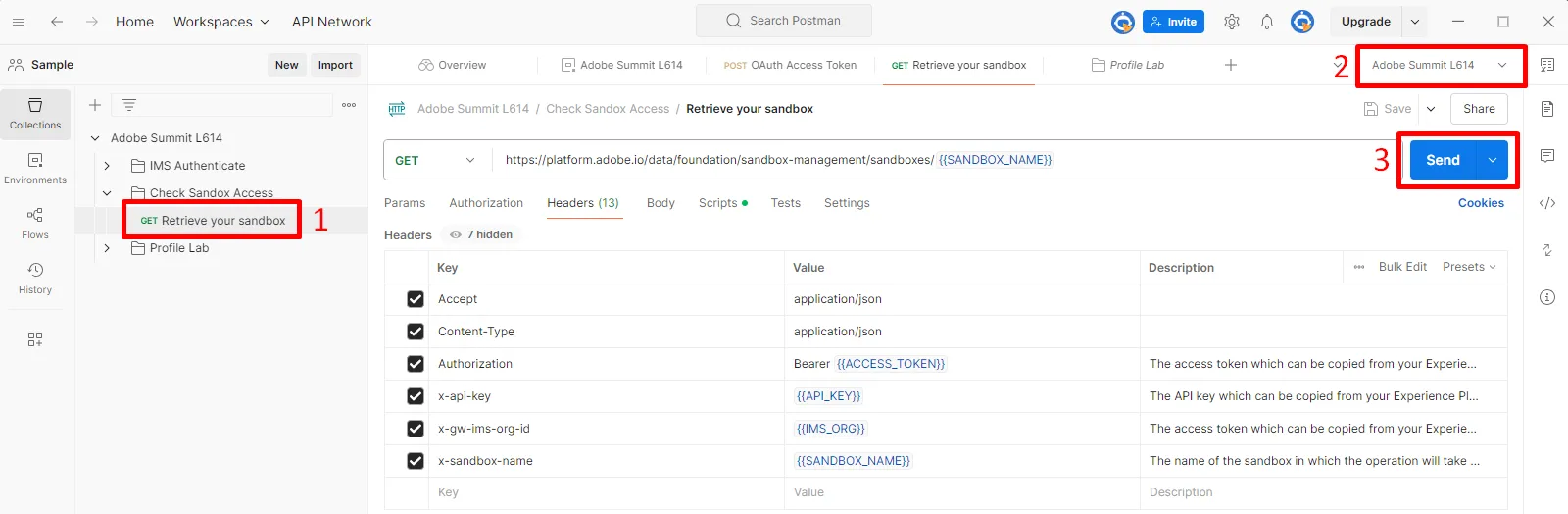
Validate Sandbox Access
A successful response will look like so:
{
    "name": "mpaas-49171-sandbox99",
    "title": "DEP Summit - sandbox99",
    "state": "active",
    "type": "production",
    "region": "VA7",
    "isDefault": false,
    "eTag": -1785884306,
    "createdDate": "2025-02-27 21:05:12",
    "lastModifiedDate": "2025-02-27 21:05:12",
    "createdBy": "[email protected]",
    "lastModifiedBy": "[email protected]"
}
The name value should match the SANDBOX_NAME variable in your postman environment
Congratulations! You are ready to start using the Experience Platform APIs