Fork the Result
Objective
This step is simple in that all you want to do is add a Fork activity such that you can duplicate the result to do two different things with it in future steps:
- Save the audience for others to use for advertising or cross-channel purposes
- Send SMS messages to the individual lines.
Create the Fork
- On the workflow canvas, click the + icon after Build Audience activity and select the Fork Activity
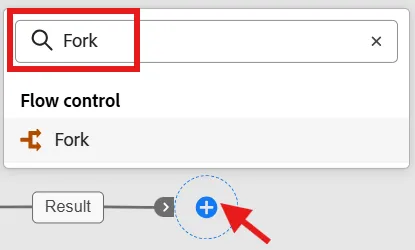
Add a fork activity
- Update the names of each transition in the fork as outlined below:
- Top --> Save Audience
- Bottom --> SMS
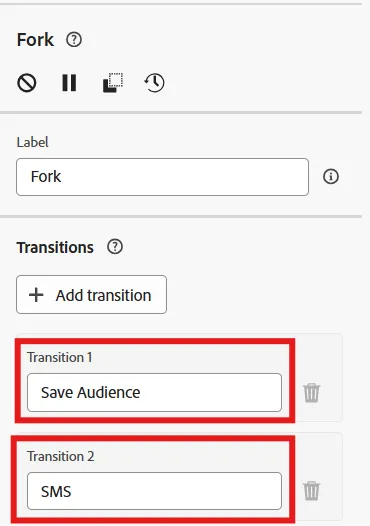
Update the transition names
When done your canvas should now look like so...
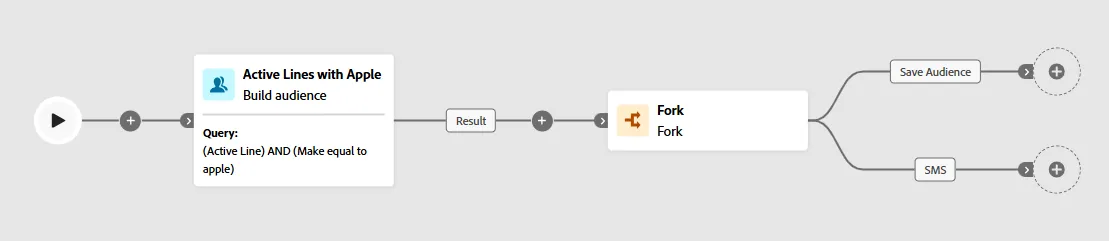
Final result with fork activity
A fork activity essentially is just duplicating the result from the previous activity into two independent branches
- Click Save on the top of the workflow canvas.

Save your work
That was pretty difficult, wasn't it 😁
Recap
Welp, you created a Fork of the result (i.e. duplicate the result) which allows you to clearly dictate a branch to process a Save Audience whereas the other one can be used for SMS sending.
You need to use Forks especially if you plan to save the audience as a Save Audience activity does not allow activites to follow it.